How to Calculate Percentage: A Practical Guide with Real Examples
What Is a Percentage?
A percentage is a way of expressing a number as a fraction of 100. The word "percent" comes from the Latin "per centum," meaning "by the hundred." When you say something is 45%, you mean 45 out of every 100, or 45 hundredths. It's a universal shorthand that makes it easy to compare values across very different scales.
Percentages, fractions, and decimals are three ways to express the same idea. The number 0.75, the fraction 3/4, and 75% all mean the same thing: seventy-five hundredths, or three-quarters of a whole. Being comfortable moving between these forms is the foundation of percentage math.
To convert a decimal to a percentage, multiply by 100. So 0.35 becomes 35%. To convert a percentage to a decimal, divide by 100. So 62% becomes 0.62. To convert a fraction to a percentage, divide the numerator by the denominator and multiply by 100. So 7/20 becomes 0.35, then 35%.
Percentages show up in virtually every area of life: sale prices at a store, interest rates on loans, grade scores in school, tax rates on your income, nutritional information on food labels, battery levels on your phone, and poll results in the news. Getting comfortable with percentage calculations is one of the most practically useful math skills you can develop.
The good news is that percentage math isn't complicated once you understand the three core formulas. Once you've got those down, you can handle almost any percentage problem you'll encounter in daily life.
The Three Core Percentage Formulas
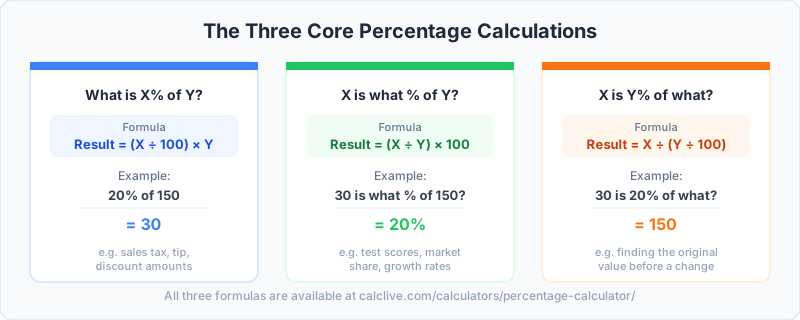
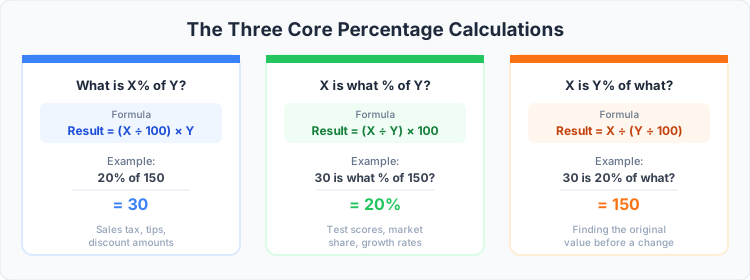
Nearly every percentage problem you'll encounter in real life falls into one of three categories. Each one asks a slightly different question, and each has a simple formula.
Formula 1: What is X% of Y?
This is the most common percentage question. You want to find a specific portion of a known number.
Formula: Result = (X / 100) × Y
Example 1: What is 20% of 85?
Result = (20 / 100) × 85 = 0.20 × 85 = 17
Example 2: What is 8.5% of $240 (for a tip calculation)?
Result = (8.5 / 100) × 240 = 0.085 × 240 = $20.40
You'll use this formula anytime you need to calculate a tip, a discount amount, a tax charge, or your share of a total.
Formula 2: X is what percent of Y?
This formula tells you what percentage one number represents of another. You have both numbers; you want to know the ratio as a percentage.
Formula: Percentage = (X / Y) × 100
Example 1: You scored 47 out of 60 on a test. What percentage did you get?
Percentage = (47 / 60) × 100 = 0.7833 × 100 = 78.33%
Example 2: Your team completed 33 out of 50 tasks this sprint. What percentage is complete?
Percentage = (33 / 50) × 100 = 0.66 × 100 = 66%
This is the formula for calculating grades, completion rates, market share, and any situation where you want to know how one value relates to a total as a percentage.
Formula 3: X is Y% of what?
This formula works backward: you know the result and the percentage, and you want to find the original whole. It's useful for finding original prices after discounts, or finding a base value from a known portion.
Formula: Whole = X / (Y / 100) = X × (100 / Y)
Example 1: You paid $63 for an item that was on sale at 30% off. What was the original price?
The sale price is 70% of the original (100% minus 30%). So: Original = 63 / 0.70 = $90
Example 2: 15% of a class scored above 90. If that's 6 students, how many students are in the class?
Whole = 6 / 0.15 = 40 students
This backward formula is often the trickiest to remember, but it's enormously useful for working out original prices before discounts, or any situation where you know a part and the percentage it represents.
Percentage Change: Increase and Decrease
Percentage change measures how much a value has gone up or down relative to where it started. It's used everywhere: salary changes, stock price movements, sale prices, population growth, and more.
Formula: Percentage Change = ((New Value - Original Value) / Original Value) × 100
If the result is positive, the value increased. If it's negative, the value decreased. Here are five realistic examples:
| Scenario | Original Value | New Value | Change | Percentage Change |
|---|---|---|---|---|
| Winter coat on sale | $180 | $126 | -$54 | -30% (discount) |
| Annual salary raise | $58,000 | $62,060 | +$4,060 | +7% (increase) |
| Gas price change | $3.20/gal | $3.68/gal | +$0.48 | +15% (increase) |
| Stock price drop | $145 | $101.50 | -$43.50 | -30% (decrease) |
| Monthly gym membership | $40 | $47 | +$7 | +17.5% (increase) |
One important thing to watch for: percentage increases and decreases are not symmetrical. If a price goes up 50% and then down 50%, you don't end up where you started. A $100 item that increases 50% becomes $150. If it then decreases 50%, you get $75, not $100. This asymmetry trips up a lot of people.
Similarly, a 100% increase means the value doubled. A 200% increase means it tripled (the original 100% plus 200% more). And something can never decrease by more than 100%, because you can't go below zero in most real-world contexts.
How to Use a Percentage Calculator
Calculating percentages by hand is useful when you understand the formulas, but for everyday situations, a calculator is faster and less error-prone. Our CalcLive Percentage Calculator handles all three core formula types. Just select the type of calculation you need (What is X% of Y? / X is what percent of Y? / X is Y% of what?), enter your values, and get an instant answer.
For shopping discounts specifically, the CalcLive Percent Off Calculator is built specifically for the task: enter the original price and the discount percentage, and it tells you both the amount saved and the final price you'll pay. This is particularly useful when you're comparing two items with different base prices and different discount percentages to see which is the better deal.
When you're using a percentage calculator, it's worth double-checking what the calculator is asking for. Some calculators accept the percentage as a whole number (enter 15 for 15%), while others expect a decimal (enter 0.15). Entering the wrong format gives you a wildly incorrect answer, and it's a surprisingly common source of errors.
Real-World Uses for Percentage Calculations
Shopping Discounts
Retail discounts are the most common percentage calculation most people encounter. When a store advertises 35% off, you need to know what the final price will be. Use Formula 1: find 35% of the original price (that's your savings), then subtract from the original to get the sale price. Or use the CalcLive Discount Calculator, which does both steps at once and shows you the sale price and the amount saved side by side.
Watch out for stacked discounts. If an item is already 20% off and then an additional 15% off is applied at checkout, that's not 35% off. You first remove 20%, then apply 15% to the already-discounted price. The combined discount is about 32%, not 35%.
Restaurant Tips
Calculating a restaurant tip is a simple application of Formula 1. A standard tip is 18% to 20% of the pre-tax bill. For a $74 bill, a 20% tip is 0.20 × $74 = $14.80. The mental math shortcut: find 10% (move the decimal point one place left, so $7.40), then double it to get 20% ($14.80). Use the CalcLive Tip Calculator to split bills among groups and calculate per-person totals including tip.
Tax Calculations
Sales tax is another direct application of Formula 1. If you're buying a $250 item with an 8.5% sales tax, the tax amount is 0.085 × $250 = $21.25, making the total $271.25. Sales tax rates vary by state and municipality, which is why the CalcLive Sales Tax Calculator is useful: you can enter your location and it applies the correct combined rate automatically.
Grade Calculations
Your percentage score on a test or assignment is a direct application of Formula 2. If you answered 34 out of 40 questions correctly, your score is (34 / 40) × 100 = 85%. Weighted grades are slightly more involved: if your final exam is worth 40% of your grade and your average on other work is worth 60%, you'd calculate each portion separately and add them. For example, 85% on regular work and 78% on the final gives you: (0.60 × 85) + (0.40 × 78) = 51 + 31.2 = 82.2% overall.
Investment Returns
Percentage change is the standard way to express investment performance. If you invested $5,000 and it grew to $5,850, your return is ((5,850 - 5,000) / 5,000) × 100 = 17%. For multi-year investments, you'll often see annualized returns, which account for the effect of compounding. A 17% gain over two years is not 8.5% per year; it's closer to 8.1% annually when compounded correctly. Understanding this distinction matters when comparing investment performance across different time periods.
Percentage vs. Percentage Points
This is one of the most commonly misunderstood distinctions in everyday math, and getting it wrong leads to real misinterpretation of data.
A percentage point is an absolute arithmetic difference between two percentages. A percentage change is the relative change expressed as a percentage of the starting value.
Here's the clearest way to see the difference: suppose interest rates rise from 2% to 3%. The change is 1 percentage point (3 minus 2 = 1). But the percentage change is 50%: the rate went up by 50% of what it was before (1 / 2 = 0.5, or 50%).
News headlines often use these terms inconsistently, which is why the confusion persists. When a politician says "unemployment dropped by 2%," they could mean two very different things. If unemployment went from 5% to 4.9%, that's a drop of 0.1 percentage points, which is a 2% decrease in the unemployment rate. If unemployment went from 10% to 8%, that's a drop of 2 percentage points, which is a 20% decrease in the rate.
The practical rule: use "percentage points" when you're talking about the raw numeric difference between two percentages. Use "percent" when you're expressing the relative change as a proportion of the starting value. Getting this right matters in finance (comparing interest rate changes), medicine (comparing treatment effectiveness rates), and any time you're analyzing data.
Common Percentage Mistakes and How to Avoid Them
| Mistake | Wrong Approach | Correct Approach |
|---|---|---|
| Confusing percent with percentage points | Rate went from 4% to 6%: "a 2% increase" | "A 2 percentage point increase" (or "a 50% increase in the rate") |
| Assuming percent changes are reversible | A 25% increase followed by a 25% decrease returns to original | $100 + 25% = $125; $125 - 25% = $93.75, not $100 |
| Finding the wrong base for a discount | To find original price from sale price, subtract the percent from the sale price | If item is 30% off, sale price = 70% of original: Original = Sale Price / 0.70 |
| Adding stacked discounts directly | 20% off plus 10% off = 30% off total | 20% off then 10% off the reduced price = 28% total discount |
| Confusing "more than" with "as much as" | "50% more" means the same as "50% of" | "50% more than $100" = $150; "50% of $100" = $50 |
The base confusion is worth spending a moment on, because it trips people up constantly. When you say something increased by X%, the base is always the original number, not the new one. When you say something decreased by X%, the base is again the original number. This seems obvious when stated plainly, but it's easy to apply the percentage to the wrong number when you're working quickly.
The stacked discounts mistake is especially common at retail checkouts. If you have a store coupon for 20% off and a manufacturer coupon for 10% off, the final price is the original minus 20%, and then that result minus 10% more. It's not simply 30% off the original price. The combined effect is always slightly less than the sum of the individual discounts.
Mental Math Shortcuts for Percentages
You don't always have a calculator handy, and even when you do, being able to quickly estimate a percentage in your head is a genuinely useful skill. Here are the shortcuts that work best in practice.
The 10% trick. To find 10% of any number, just move the decimal point one place to the left. 10% of $340 = $34. 10% of 1,750 = 175. This is your most powerful starting point because nearly every other percentage can be built from 10%.
The 1% trick. To find 1%, move the decimal point two places to the left. 1% of $580 = $5.80. Once you have 1%, you can multiply to find any percentage you need.
Building from 10%. To find 20%, double your 10% figure. To find 5%, halve your 10% figure. To find 15%, add your 10% and 5% figures together. To find 30%, triple your 10% figure. This approach lets you calculate most common percentages with simple arithmetic.
Example: 15% tip on a $86 bill. 10% of $86 = $8.60. 5% of $86 = $4.30. 15% = $8.60 + $4.30 = $12.90.
Finding 25%. Divide by 4. 25% of $200 = $50. 25% of $84 = $21.
Finding 75%. Find 25% (divide by 4) and multiply by 3. Or find 100% and subtract 25%.
The complement trick for discounts. Instead of calculating the discount and subtracting, calculate what percentage you'll pay and multiply directly. A 30% discount means you pay 70%. So a 30% discount on $150 is 0.70 × $150 = $105. This is often faster than calculating 30% and then subtracting.
Switching the numbers. X% of Y always equals Y% of X. So 8% of 25 is the same as 25% of 8. 25% of 8 = 2, which is much easier to calculate than 8% of 25. Look for opportunities to swap the numbers when one is easier to work with as a percentage.
Practicing these shortcuts regularly will make percentage calculations feel automatic. Start by applying them to everyday situations: calculating tips at restaurants, estimating discounts while shopping, or figuring out how much of your budget goes to different categories.
Frequently Asked Questions
What is 20% of 150?
20% of 150 is 30. Use the formula: (20 / 100) × 150 = 0.20 × 150 = 30. For the quick mental math version: 10% of 150 is 15, and doubling that gives you 20%, which is 30.
How do I calculate a percentage increase?
To calculate a percentage increase, subtract the original value from the new value, divide that difference by the original value, and multiply by 100. The formula is: ((New Value - Original Value) / Original Value) × 100. For example, if your salary went from $52,000 to $56,160, the increase is $4,160. Divide by the original $52,000 to get 0.08, then multiply by 100 to get an 8% increase.
What's the difference between percent and percentage points?
A percentage point is the absolute arithmetic difference between two percentages. A percent change is the relative change as a proportion of the starting value. If an interest rate rises from 3% to 4.5%, that's an increase of 1.5 percentage points, but it's a 50% increase in the rate itself (because 1.5 is 50% of 3). Always specify which meaning you intend when discussing changes between percentages, especially in financial or statistical contexts.
How do I calculate percentage of marks (grades)?
Divide the marks you earned by the total marks possible, then multiply by 100. If you scored 72 out of 90: (72 / 90) × 100 = 80%. For weighted grades, multiply each component score by its weight percentage (as a decimal), then add all the weighted scores together. For example, if homework is 30% of your grade and you scored 85%, and your exam is 70% of your grade and you scored 74%, your final grade is (0.30 × 85) + (0.70 × 74) = 25.5 + 51.8 = 77.3%.
How do I find the original price after a discount?
If you know the sale price and the discount percentage, you can work backward to find the original price. First, figure out what percentage of the original price you paid (100% minus the discount percentage). Then divide the sale price by that percentage expressed as a decimal. For example, if you paid $84 for an item that was 30% off, you paid 70% of the original. So the original price is $84 / 0.70 = $120. You can verify this: 30% of $120 is $36, and $120 minus $36 is $84.
How do you calculate percentage in Excel?
In Excel, percentages are calculated using the same math as any other approach, but you can use cell references to make formulas dynamic. To find X% of a value in cell A1, you'd enter: =A1*0.20 (for 20%). To find what percentage one number is of another, divide them: =B1/A1 and then format the cell as a percentage. For percentage change, use: =(B1-A1)/A1 and format as a percentage. Excel will display the result as a formatted percentage (like 15.00%) when you apply percentage number formatting, which means you don't need to multiply by 100 manually in the formula. One tip: always make sure your base value (the denominator) is not zero before using a division formula, or you'll get a #DIV/0! error.
Ready to Run the Numbers?
Use our free calculators to put these ideas into practice. No signup, no downloads.